Bolt with prestress

Hello,

I am trying to simulate a pre-stressed bolted connection in two plates. The upper one is fixed in its top face and the lower one has a downwards force on the bottom face, pulling it down (so, the effect is getting them appart). Also there is a screw and a nut. To do so, I am using the tips of

https://github.com/ScopeIngenieria/CA_bolt_pretension/blob/master/README.md

applying a prestress field with CREA_CHAMP. I have also read the post:

https://forum.code-aster.org/public/d/25524-pretension-bolted-connection

My set up is:

  1. Face of upper plate mesh (2D group) and screw mesh (3D group) linked together at the screw head footpring with a LIAISON_MAIL.
  2. Face of lower plate mesh (2D group) and nut mesh (3D group) linked together at the nut footprint with a LIAISON_MAIL.
  3. Cylindrical surface representing the nut thread (2D group) and screw rod (3D group) linked together with a LIASION_MAIL.
  4. Lower face of upper plate mesh (2D group) and upper face of lower plate mesh (2D group) in contact with DEFI_CONTACT, as I expect that these two faces could separate if the load is big enough.

I have tried setting the type of charge for LIAISON_MAIL as FIXE_CSTE and DIDI, but it does not change the result. Calculation gets stack at 50%. Does anyone have a clue? What am I doing wrong?
[upl-file uuid=16c75b17-9d5b-4317-9fc6-ec45dc1530d4 size=3kB]stage-1.txt[/upl-file]
and the mesh

[upl-file https://forum.code-aster.org/public/assets/files/2025-10-07/1759856895-386064-mshcomplete.rar[/upl-file]

I described the best method how to do bolt preload in CA here https://forum.code-aster.org/public/d/26352-the-best-way-how-to-do-bolt-preload

nowadays I would just have the same name for resnon_2 and 1 and use reuse resnon_1

Hi,

I have just found out that my mistake (or one of them). I had FORCE_NODALE=40000 N, thinking that it was applied to all nodes! But there were 585 nodes, so the total force was 23.4 MN. So I replaced it with a FORCE_FACE, I tried running the case without contact (as explained in https://forum.code-aster.org/public/d/29971-beginner-question-contacts/38) and later with contact, having a result. However, I am not happy with it.

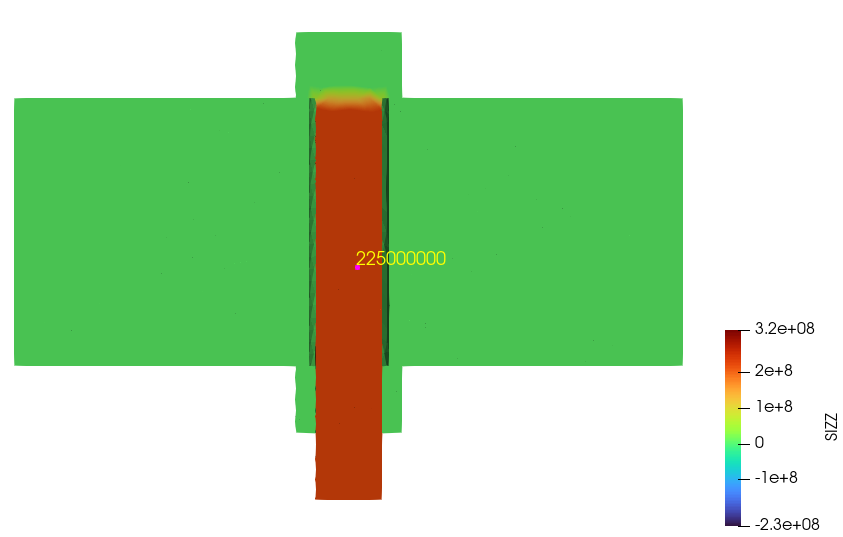
I set up the timeframe from 0 to 1s, with a ramp function for the load. At t=0, I have a prestress (coming from CREA_CHAMP as ETAT_INIT), this is ok:

[upl-image-preview uuid=f0e9d5bc-c8ae-417a-a2be-d1ac6e71b8c4 url=

alt={TEXT?}]

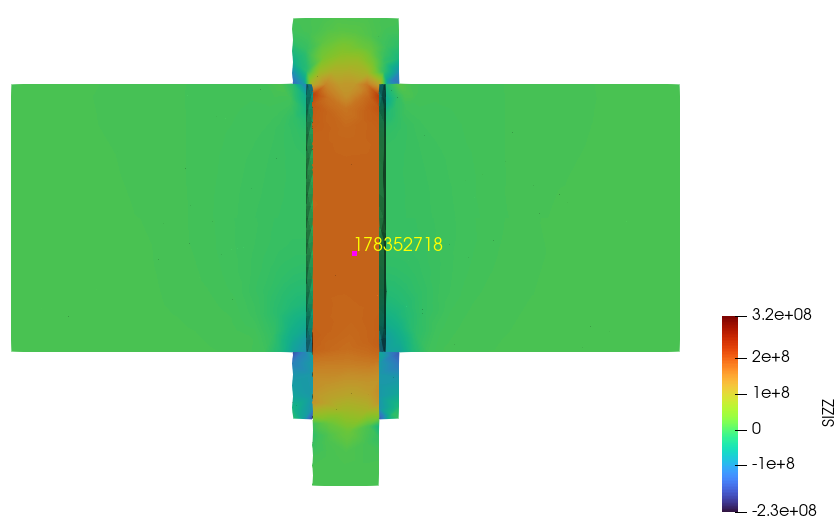
At t=0.1 s, the load is applied at 10%. So, in a real bolt, I would expect to have the prestress + 10% of load, as the screw stress increases as the load is applied. But it is not the case:

[upl-image-preview uuid=05693002-9321-43a3-8c04-55675e9fbe5e url=

alt={TEXT?}]

I would check @jacob proposal and let you know

@seirov

Hello,

I didn’t follow all of what you did, but the connection relaxing with parts is perfectly normal. It comes down to what do you call ‘prestress’?

In the first image, the part(s) (head, plate, nut) are clearly not loaded. You apply a tension to the shaft. So I assume, you call this prestress?

As soon as the part is connected, the part(s) themselves act like springs and are compressed → the pretension/prestress decreases. In the real world, we would call this stress “bolt tension or bolt pretension”.

Then your external load comes into play and does, whatever.

In the real world, bolted connections also relax, even minutes or hours after the bolt is mounted. Study bolt standards like VDI2230 and bolt diagrams, the part(s) always plays an important role. So essentially: your applied prestress cannot be of the same value with the part. When you do a lot of calculations with bolts, at some point, you’ll notice WHY they look the way the do. The way bolt heads, underheads, underhead radii, socket radii, shaft dias, shaft lengths, thread depths, thread angles, wrenches, spanners, Allen keys, Torx keys are designed and made is no coincidence.

Mario.

@jacob

Thanks! I followed your case and got mine run :slight_smile:

I screwed up at the beginning because some sintax has changed, now there is no need to specifify DDL_ESCL and DDL_MAIT, but just DDL:

tightening = AFFE_CHAR_MECA(identifier='16:1',
                         LIAISON_MAIL=_F(DDL=('DNOR', ),
                                         GROUP_MA_ESCL=('nutThread', ),
                                         GROUP_MA_MAIT=('screwRod', ),
                                         TYPE_RACCORD='MASSIF'),
                         MODELE=model)

However, there is still one thinks that I don’t understand: why do we need to use DIDI with the LIAISON_MAIL at the second stage? I have tried out a run with and without, and results are not the same:

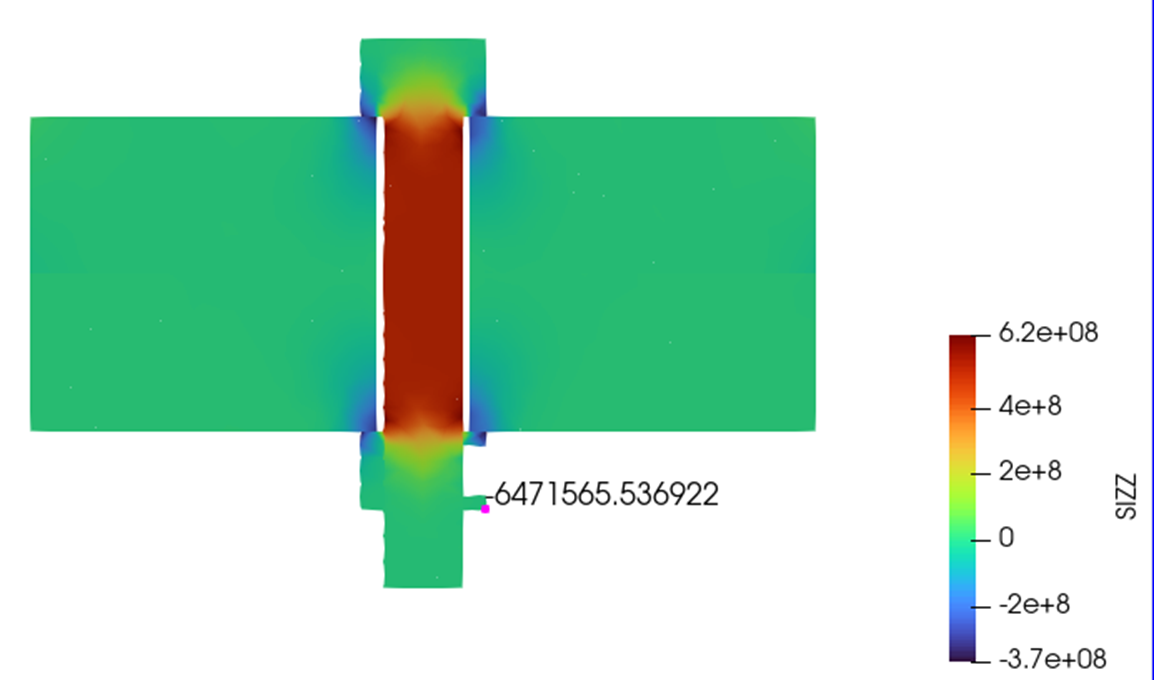
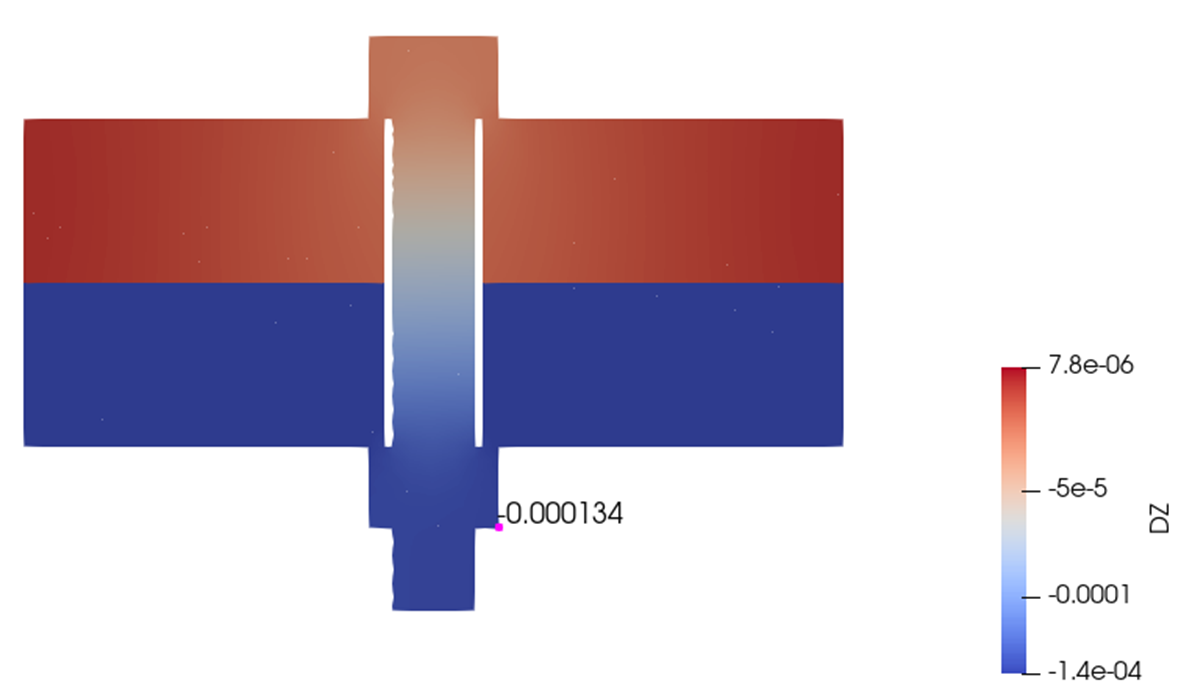
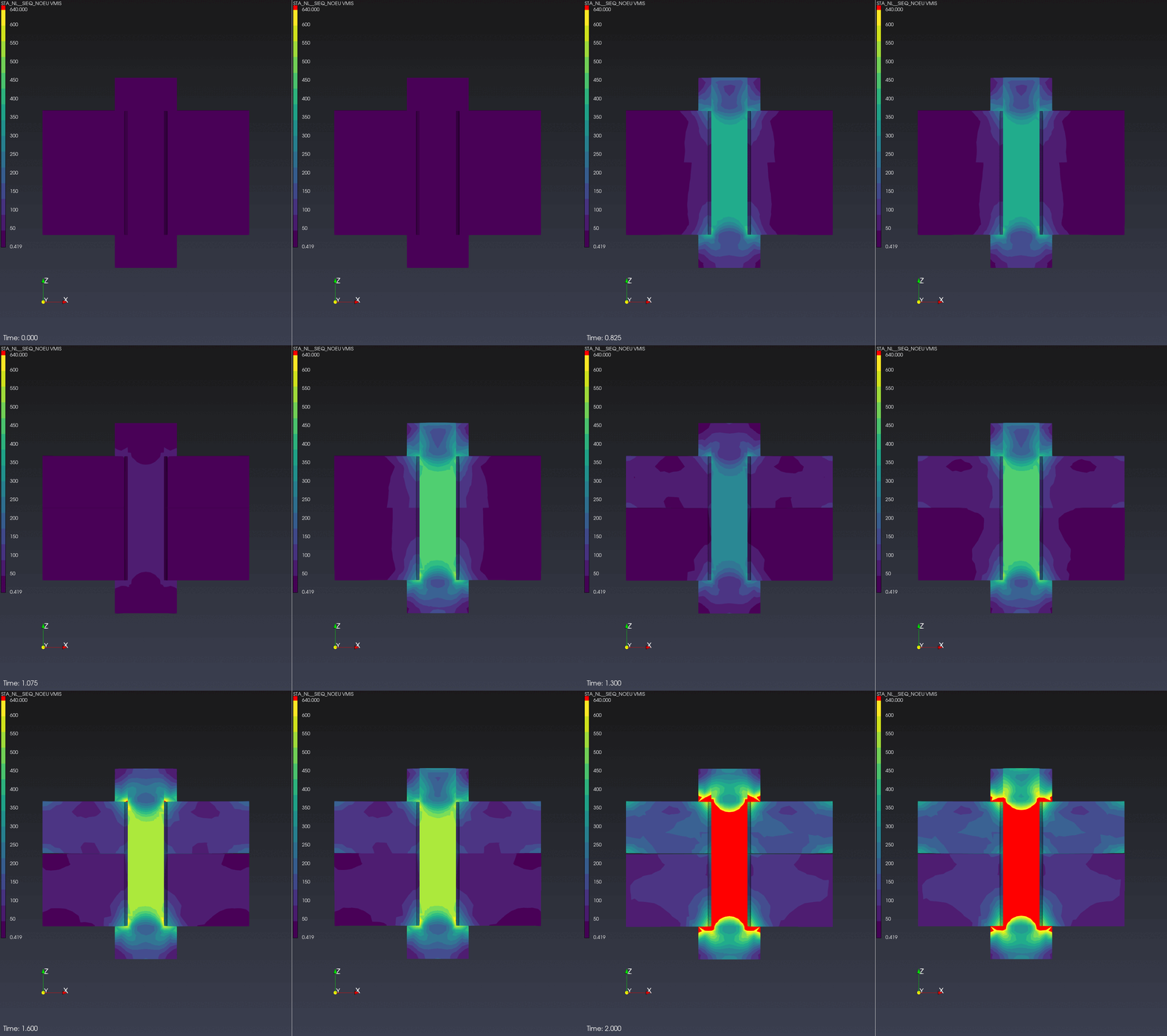
  1. without TYPE_CHARGE=‘DIDI’, at t=2 s (end of simulation):

[upl-image-preview uuid=2acbcda5-9bb9-4dcb-99c6-18724d087da4 url=

alt={TEXT?}]

[upl-image-preview uuid=c41a9768-3985-4d3c-9860-8fa2a47a00b0 url=

alt={TEXT?}]
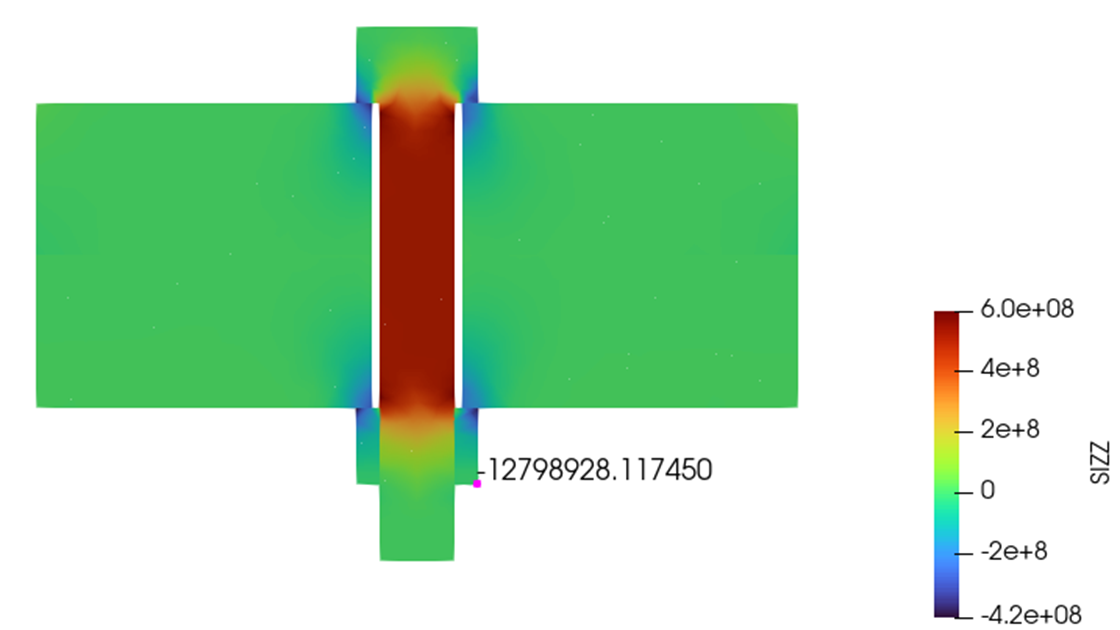
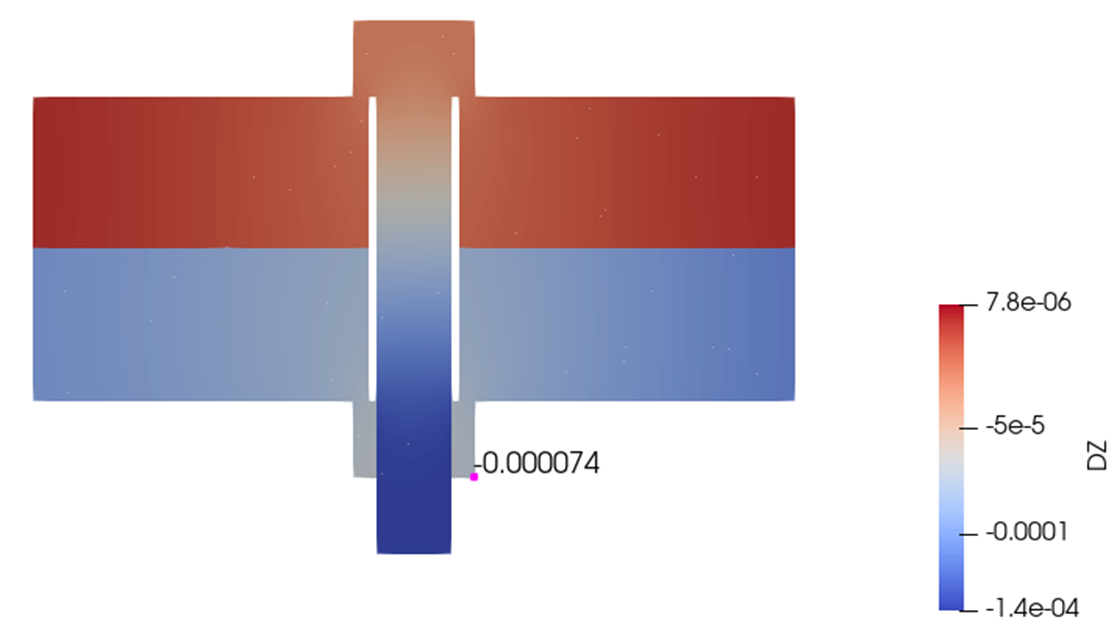
2. with TYPE_CHARGE=‘DIDI’, at t=2 s (end of simulation):

[upl-image-preview uuid=92d95ec8-86c6-4ac8-bf23-39d2f3a01dc1 url=

alt={TEXT?}]

[upl-image-preview uuid=81d906cc-b882-49ef-88fb-8ae8fea7df22 url=

alt={TEXT?}]

To sum up, with DIDI I obtain double stress and half deformation than without. I read the documentation (where it is not clear what DIDI does) and some posts related (where the conclusion is that documentation is not clear!). Anyone has a good explanation?

[upl-file uuid=98438c5c-019c-4461-b98f-dc02bc9a6501 size=6kB]didi-stage-1.comm[/upl-file]

@seirov

DIDI option allows you to apply the previous ‘state’, which is vital for bolt preloads.

1st you apply the axial bolt force (preload) you need; but then (crucially) you must ‘lock’ the bolt length, like in a real cold assembly in the workshop when you torque a bolt, the bolt is always one solid part. If you don’t do that in FEA, then your axial 1st preload will remain the same, which is incorrect.

By ‘locking’ the bolt after cold_assy load, you prepare the bolt to take thermal and mechanical loads on top of the cold_assy preload. Makes sense?

Then, you should output on a table in the text results file the bolt load history. Then you will see that if you apply a thermal load (increase in temperature) after locking it, the axial tensile load on the bolt shank, should go up; e.g. if you are clamping aluminium parts with a steel bolt. When you apply mechanical loads affecting the bolt, then the force history should show a fluctuation around the 1st preload, coz it was locked by DIDI on the 2nd step.

yes, you need to prescribe the equations dx,y,z = dx,y,z in NEW state

without with

[upl-image-preview uuid=8781cdf3-36e9-4fe9-8b80-4ef8e42a271f url=bolt-preload.gif alt={TEXT?}]

I would be careful to use DNOR, since your mesh is not coincident in thread region

Thanks! Now it is understood!

I attached both mesh and commands file.

Bolt with prestress.rar

to merge the fields do this

`

resnon = STAT_NON_LINE(identifier=‘19:1’,

                     ARCHIVAGE=_F(LIST_INST=listr),

                     CHAM_MATER=fieldmat,

                     COMPORTEMENT=_F(DEFORMATION='PETIT',

                                     RELATION='ELAS',

                                     TOUT='OUI'),

                     CONTACT=contact,

                     CONVERGENCE=_F(ITER_GLOB_MAXI=20),

                     EXCIT=(_F(CHARGE=BC),

                            _F(CHARGE=bind),

                            _F(CHARGE=prestr,

                               FONC_MULT=fprestr),

                            _F(CHARGE=tightening)),

                     INCREMENT=_F(INST_FIN=1.0,

                                  LIST_INST=times),

                     MODELE=model)

resnon = STAT_NON_LINE(identifier=‘20:1’,

                    **reuse=resnon,**
                    

                     ARCHIVAGE=_F(LIST_INST=listr),

                     CHAM_MATER=fieldmat,

                     COMPORTEMENT=_F(DEFORMATION='PETIT',

                                     RELATION='ELAS',

                                     TOUT='OUI'),

                     CONTACT=contact,

                     CONVERGENCE=_F(ITER_GLOB_MAXI=20),

                     ETAT_INIT=_F(EVOL_NOLI=resnon),

                     EXCIT=(_F(CHARGE=BC),

                            _F(CHARGE=bind),

                            _F(CHARGE=load,

                               FONC_MULT=fload),

                            _F(CHARGE=tightened,

                               TYPE_CHARGE='DIDI')),

                     INCREMENT=_F(INST_INIT=1.0,

                                  LIST_INST=times),

                     MODELE=model)

`